
We all know that feeling: you're just one or two stamps away from completing an album, but the last few are playing hard to get. Enter the Wild Card!🃏
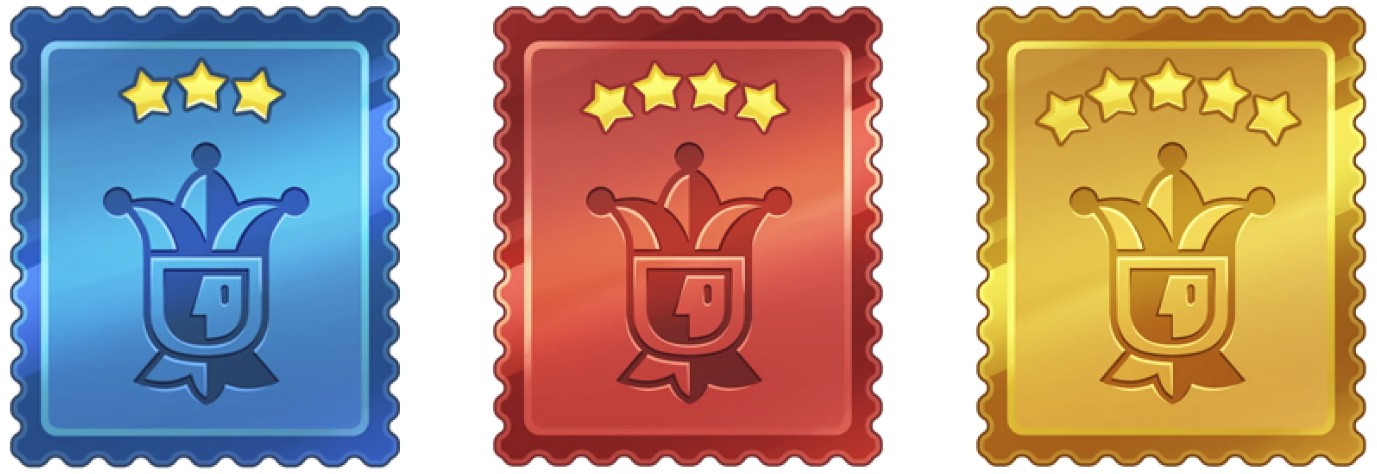
This isn't just any reward… it’s a valuable card designed to save the day by replacing a missing stamp (of equal or lower rarity) in your current album!
You can earn these powerful cards as rewards through our various Events or Duos, via Special Offers in our Store, or sometimes even as a surprise gift in your Mailbox. 🎁
How does it work?
The Wild Card means instant gratification: it’s ready to use as soon as you receive it!🃏
As soon as you receive a Wild Card, you’ll be automatically redirected to your Collections. You’ll then need to choose one of your missing stamps to replace it with this Wild Card and potentially complete your album!🪄
⚠️You must do this immediately; you cannot save your Wild Cards for later.
⚠️The rarity level of the Wild Cards you obtain matters! They come in three rarity levels: 3⭐, 4⭐, and 5⭐. A Wild Card can therefore replace any stamp of equal or lower rarity! 🎉
If you win multiple Wild Cards at the same time, don’t panic! You can choose your stamps one by one until all your Wild Cards are used. ✨
What if none of your missing stamps match the right rarity level? 🧐
We’ve got you covered! If you receive a Wild Card but have already collected all the stamps for that rarity level (or lower), your reward isn’t lost. Your Wild Card is automatically converted into a generous number of duplicates to help you continue your progress:
3-Star Wild Card ⭐➔ 2000 duplicates
4-Star Wild Card ⭐➔ 3000 duplicates
5-Star Wild Card ⭐➔ 4000 duplicates
A window will then pop up showing you the exact number of duplicates added to your progress bar!💹
Check out your Collections!📖
For more details about our various features, you can browse our FAQs and, of course, if you would like more information on this topic, we invite you to contact our Customer Support by tapping on the Settings tab (with the 3 lines) at the top right of your home screen, then on Help. To open a conversation, you can either tap on the speech bubble 💬 in the top right corner or tap on ‘Chat with us’ at the bottom of the page.
Have fun and enjoy playing!